




A good product testing strategy looks at many angles. It checks if the product works as planned. It also sees if real people like using it. It finds problems before launch. This saves money and builds trust with customers. It covers different types of tests for different goals.
Understanding Product Testing Strategy
At its heart, a product testing strategy is a roadmap. It shows you the steps to take. These steps ensure your product is great. It needs to work right. It also needs to meet what people want. Think of it as a quality check. But it’s much more than just a simple check. It’s about planning ahead. You want to catch issues early. This saves you trouble later. It helps you make something truly valuable. A good strategy looks at the product from many sides. It asks if it’s safe. It asks if it’s easy to use. It asks if it solves a real problem. It’s a detailed plan to make sure your product shines.
Why is this so important? Imagine launching a product. Then, customers find big bugs. Or maybe they just don’t get why they need it. That’s a tough spot to be in. It hurts your brand. It wastes resources. A smart testing strategy helps avoid this. It acts as a safety net. It guides your efforts. It makes sure you’re testing the right things. It helps you learn what users truly think. This makes your product better. It increases its chances of success. It’s about being proactive. It’s about building quality from the start.
The goal is simple: create a product that works well. It should also delight users. A well-thought-out strategy makes this happen. It’s a crucial part of product development. It’s not an add-on. It’s woven into the whole process. This ensures you’re not just building something. You’re building the right thing. And you’re building it in the right way. This thoughtful approach pays off. It leads to happier customers. It leads to a stronger business. It’s about building trust and value.
Why a Solid Testing Strategy Matters
- Reduces Risk: Catches flaws before they reach customers.
- Saves Money: Fixing problems early is cheaper.
- Improves Quality: Makes the product more reliable and robust.
- Boosts User Satisfaction: Ensures the product meets user needs.
- Builds Trust: A well-tested product shows you care.
- Gains Insights: You learn what users really think.
The Core Components of a Product Testing Strategy
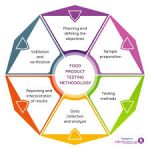
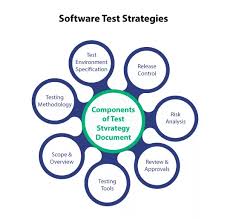
A robust product testing strategy has several key parts. You can’t just guess what to test. You need a clear plan. This plan helps you cover all the important bases. It makes sure you’re not missing anything critical. Let’s look at these building blocks. They form the foundation of smart testing.
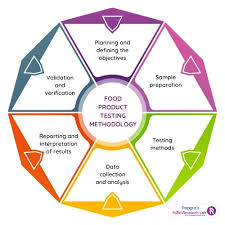
First, you need to define your testing goals. What do you want to achieve with testing? Are you looking for bugs? Do you want to see if users understand your new feature? Is it about checking performance under heavy load? Clear goals guide all your testing efforts. They tell you what to focus on. Without clear goals, testing can become aimless. You might test things that don’t matter much. This wastes time and resources.
Next, you must identify what to test. This is the scope of your testing. What features will you check? What parts of the user journey? What about the overall experience? Think about the most important aspects of your product. What would cause the biggest problems if it failed? Prioritize these areas. You can’t test everything all the time. You need to be smart about it. Consider the core functions. Think about new additions. Also, look at areas that caused issues before.
Then comes how you will test. This is about choosing the right testing methods. There are many ways to test. Some are manual. Some are automated. Some involve real users. Others are done by your team. The method you choose depends on your goals. It also depends on what you’re testing. For example, usability testing with real users is great for understanding user experience. Automated tests are perfect for catching bugs quickly and repeatedly.
You also need to think about who will test. Will your internal team do it? Will you hire external testers? Will you use a beta group of customers? Each option has pros and cons. Your internal team knows the product well. External testers can offer fresh eyes. Beta users provide real-world feedback. Choosing the right testers is vital for getting good insights.
Finally, you must plan for when to test. Testing isn’t a one-time event. It happens throughout the product life cycle. You test during development. You test before a major release. You might even test after launch. Integrating testing at different stages is crucial. It ensures quality is built in, not added later. This continuous approach is more effective. It leads to a much better end product.
Key Elements of a Testing Strategy
- Clear Goals: What do you aim to find or confirm?
- Defined Scope: What specific parts will you test?
- Chosen Methods: How will you conduct the tests?
- Participant Selection: Who will perform the tests?
- Timing: When in the product lifecycle will testing occur?
- Success Metrics: How will you know if the tests were successful?
My Own Testing Trial by Fire
I remember working on a small mobile app a few years back. It was a simple task manager. We thought we had it all figured out. The team was excited. We’d built what we thought users wanted. We did some basic checks ourselves. Everything seemed to work fine on our phones. We decided it was ready. We launched it to a small group first. Then, the feedback started rolling in. It was a mix of confusion and frustration.
One user wrote, “I can’t figure out how to mark a task as complete.” Another said, “The buttons are too small, I keep tapping the wrong one.” I stared at my screen, a knot forming in my stomach. We had focused so much on the features. We hadn’t really stepped into a new user’s shoes. We hadn’t thought about how someone completely unfamiliar would interact with it. Our internal testing was too close to the product. We knew where everything was. We knew how it was supposed to work.
That was a wake-up call. We hadn’t planned for usability testing with actual people outside our team. We hadn’t considered different screen sizes or finger dexterity. We thought we were done. But we were just starting. We had to scramble. We brought in a few friends who had never seen the app. We watched them use it. It was eye-opening. We saw so many little issues we’d completely missed. This experience taught me a huge lesson. A good product testing strategy is about empathy. It’s about seeing your creation through fresh eyes. It’s about planning for the unexpected user.
Types of Product Testing
There isn’t just one way to test a product. Different types of tests serve different purposes. A comprehensive product testing strategy uses a mix of these. This helps you cover all bases. It ensures your product is robust. It also ensures it’s user-friendly. Let’s explore some common types.
Functional Testing: Does it Work?
This is the most basic form of testing. It checks if each function of the product works as designed. For software, this means checking buttons, forms, and workflows. For a physical product, it means checking if it powers on, if parts move correctly, and if it performs its intended task. It’s about verifying the “what” it’s supposed to do.
- Unit Testing: Checks small, isolated parts of the product.
- Integration Testing: Checks how different parts work together.
- System Testing: Checks the entire product as a whole.
Usability Testing: Is it Easy to Use?
This type of testing focuses on the end-user experience. It observes how real people interact with your product. The goal is to find out if it’s intuitive, efficient, and enjoyable to use. It helps identify confusing interfaces or difficult workflows. This is where you learn if users can actually accomplish their goals without frustration. It’s a critical step for customer satisfaction.
- Task Completion: Can users perform key actions?
- Navigation Clarity: Is it easy to find features?
- User Satisfaction: Do users feel positive about the experience?
- Efficiency: How quickly can users complete tasks?
Performance Testing: How Fast and Stable Is It?
This tests how the product behaves under different loads. It checks speed, responsiveness, and stability. Can your app handle thousands of users at once? Does your device overheat after prolonged use? Performance testing is crucial for ensuring a smooth experience, especially when many people are using it simultaneously. It prevents crashes and slow downs.
- Load Testing: Checks performance with expected user numbers.
- Stress Testing: Pushes the product beyond its limits to find breaking points.
- Scalability Testing: Sees if the product can handle growth.
Security Testing: Is it Safe from Threats?
This is vital for any product that handles sensitive data. Security testing aims to find vulnerabilities. It checks for ways malicious actors could access, alter, or steal information. It also ensures the product protects user privacy. With increasing cyber threats, robust security testing is non-negotiable. It builds trust and prevents costly breaches.
- Vulnerability Scanning: Identifies known weaknesses.
- Penetration Testing: Simulates real attacks to find holes.
- Access Control Testing: Ensures only authorized users can access data.
Compatibility Testing: Does it Work Everywhere?
Products often need to work across different environments. This could mean various operating systems, web browsers, devices, or even network conditions. Compatibility testing ensures your product behaves consistently. It prevents issues where it works perfectly on one setup but fails on another. This is key for reaching a wider audience.
- Browser Compatibility: Checks across Chrome, Firefox, Safari, etc.
- Device Compatibility: Tests on phones, tablets, and desktops.
- OS Compatibility: Verifies performance on Windows, macOS, Android, iOS.
Beta Testing: Real-World Feedback
This involves releasing a near-final version of the product to a select group of real users. These users test the product in their own environments. They provide feedback on bugs, usability issues, and overall satisfaction. Beta testing offers invaluable insights into how the product performs in the wild. It’s a great way to catch those last-minute problems.
- Open Beta: Available to anyone who signs up.
- Closed Beta: Limited to a specific group of invited users.
- Targeted Beta: Focuses on users with specific demographics or needs.
Building Your Product Testing Strategy Framework
Now that we know the components and types, let’s weave them together. Creating a solid product testing strategy framework is key. It’s not just about doing tests. It’s about having a repeatable process. This process ensures you’re always thinking about quality. It helps you adapt as your product grows.
Start by understanding your target audience. Who are you building this for? What are their needs? What are their tech skills? Knowing your audience shapes your testing. If your users are not tech-savvy, usability testing becomes even more important. If they are power users, performance and advanced features might be key. Tailor your strategy to them.
Map out the user journeys. Think about the path a user takes from start to finish. What are the critical steps? Test these paths thoroughly. Any friction in a key journey can cause users to leave. For example, if buying something is hard, people won’t buy it. Document these journeys. Then, align your testing efforts with them.
Define your testing phases. When will each type of testing happen? Early on, you might focus on functional and unit tests. As the product develops, you’ll add integration and system tests. Before launch, usability and beta testing become critical. After launch, performance and security checks continue. A phased approach ensures that quality is built in at every stage. It’s about continuous improvement.
Choose your testing tools and methods. What software will you use? Will you conduct in-person tests or remote sessions? Will you rely on automated scripts? Select tools that fit your budget and your team’s skills. For instance, tools like Selenium can automate web testing. UserTesting.com can help you find beta testers. The right tools make testing more efficient and effective.
Establish a clear feedback loop. Testing is only useful if the feedback is acted upon. How will you collect feedback? How will you prioritize issues found? Who is responsible for fixing them? Make sure there’s a system in place. This ensures that testing results lead to actual improvements. Without this loop, testing becomes just an exercise.
Finally, plan for iteration. Your first round of testing will uncover issues. Your second round will test the fixes. This cycle of testing, fixing, and re-testing is crucial. A good product testing strategy embraces this. It understands that quality is a journey, not a destination. Be prepared to go through multiple cycles. This ensures you deliver the best possible product.
Building Your Framework: A Step-by-Step
- Understand Your Users: Define demographics, needs, and tech skills.
- Map User Journeys: Identify critical paths users take.
- Define Testing Phases: Align tests with development stages.
- Select Tools & Methods: Choose what works best for your team.
- Create Feedback Loops: Ensure insights lead to action.
- Plan for Iteration: Embrace cycles of testing and fixing.
When Is Your Product Ready? Setting Exit Criteria
One of the hardest parts of a product testing strategy is knowing when to stop. How do you decide your product is “ready” for launch? This is where exit criteria come in. They are the conditions that must be met before you can confidently release your product. Without them, testing can go on forever. Or worse, you might stop too soon.
What kind of things become exit criteria? Think about the severity of bugs. Are there any critical bugs left open? Critical bugs are show-stoppers. They prevent users from doing basic tasks or cause the product to crash. Most strategies require all critical bugs to be fixed. They also might require most major bugs to be resolved.
Another common criterion is passing key test cases. If you have a list of essential functions, they all need to pass. For example, if your e-commerce site can’t process payments, it’s not ready. You should have a set of “go/no-go” tests. These are the absolute must-haves.
User acceptance is also important. Did your beta testers find the product acceptable? Did they feel it met their needs? Sometimes, a product can be technically sound but not what users want. Customer feedback from beta testing can be a key exit criterion. You might set a threshold for user satisfaction ratings.
Performance targets can also be exit criteria. Is the product fast enough? Does it use resources efficiently? If your product is too slow, users will abandon it. You might have specific metrics for response times or memory usage that must be met.
Defining these criteria early is important. It sets clear expectations for the team. It also provides an objective way to make the launch decision. It stops endless debate. It ensures that the product meets a certain standard before it’s released. A well-defined set of exit criteria is a sign of a mature product testing strategy.
Typical Exit Criteria Examples
| Criterion | Description |
|---|---|
| Bug Severity | Zero critical bugs, less than X major bugs. |
| Test Case Pass Rate | 100% pass rate for critical test cases. |
| User Acceptance | Positive feedback from beta testers, >X% satisfaction. |
| Performance Benchmarks | Meets defined response time and stability metrics. |
| Security Audit | No high-risk vulnerabilities identified. |
Real-World Context: Testing Software vs. Physical Products
While the core principles of a product testing strategy remain the same, the specifics change. Testing software has different challenges than testing physical goods. Understanding these differences helps you refine your approach. It ensures you’re focusing on the right things for your specific product type.
For software products, the emphasis is often on code. We look for bugs in logic. We test user interfaces for responsiveness and design. Compatibility across devices and operating systems is a major concern. Performance under heavy load is critical. Security testing is paramount due to digital threats. Automated testing plays a huge role here. It can run thousands of tests quickly. This helps catch regressions, which are errors introduced when new code is added. Feedback often comes from digital channels, like bug reports and user surveys.
With physical products, the focus shifts. We test materials, durability, and safety. Does the product break under normal use? Is it safe to touch or use? How does it hold up to wear and tear? Ergonomics and how it feels in the hand are important. Manufacturing defects are a key concern. For example, a batch of toys might have sharp edges. Testing involves physical stress tests, material analysis, and real-world use simulations. Standards from bodies like the Consumer Product Safety Commission (CPSC) are vital. Compliance with these standards is a major part of the testing strategy.
Consider a new smartphone. Its testing strategy would involve both. You’d test the software (apps, operating system, camera interface) for bugs and usability. You’d also test the hardware (battery life, screen durability, signal strength, physical integrity if dropped). Both aspects need rigorous testing. A bug in the software can be annoying. A flaw in the hardware can be dangerous.
For example, a new kitchen appliance would undergo safety testing to meet UL standards. It would also be tested for how well it cooks or mixes. Usability testing would check if the controls are easy to understand. Durability testing would see how it holds up after hundreds of uses. The entire lifecycle, from component sourcing to final assembly, needs a testing lens. This holistic view is what makes a product testing strategy truly effective for any product type.
What This Means for Your Product
Understanding a good product testing strategy has direct impacts. It’s not just an academic exercise. It changes how you build and launch products. When you have a solid plan, you’re less likely to face major issues down the line. This saves you stress and heartache.
For you, this means your product will likely be more reliable. When you test thoroughly, you catch bugs and flaws. This leads to a more stable and dependable product. Customers will experience fewer frustrating errors. They will be able to use your product as intended, without hiccups.
It also means your product will be more user-friendly. By involving real users in testing, you learn how they actually interact with your product. You discover where they get confused or stuck. This allows you to make improvements. You can simplify processes. You can clarify instructions. The result is a product that’s a joy to use, not a puzzle.
You’ll also find that your product’s reputation improves. A product that works well and is easy to use leads to happy customers. Happy customers tell others. They leave positive reviews. They become loyal advocates for your brand. This positive word-of-mouth is invaluable. It’s built on trust, which a good testing strategy helps create.
Economically, it makes sense too. Fixing bugs after a product launches is much more expensive. It can involve costly recalls, customer support overloads, and damage control. Investing in testing upfront saves significant money in the long run. It means fewer costly mistakes and more predictable product launches.
Ultimately, a strong product testing strategy means you’re building confidence. You’re building confidence in your product. You’re building confidence with your customers. It shows you are serious about quality. You are committed to delivering value. This confidence is the bedrock of any successful product and business.
Quick Tips for Better Product Testing
Implementing a full testing strategy can seem daunting. But even small steps can make a big difference. Here are a few quick tips to boost your testing efforts. These are easy to start with. They can lead to noticeable improvements.
Start Testing Early and Often: Don’t wait until the product is almost finished. Test as soon as you have something to test. Even testing a single feature or a prototype is better than nothing. Continuous testing finds problems when they are small and easy to fix.
Involve Real Users: Get feedback from people who are not on your team. They have fresh eyes. They will use the product in ways you didn’t expect. Simple usability tests with friends or family can reveal huge insights.
Prioritize Test Cases: You can’t test everything. Focus on the most important functions and user journeys. What are the core features? What would upset users the most if it failed? Test these areas with extra care.
Document Everything: Keep clear records of your tests. What did you test? What were the results? What issues did you find? This documentation is vital. It helps track progress. It shows what needs fixing. It provides a history for future testing.
Automate Where Possible: For repetitive tasks, consider automation. Automated tests can run quickly and consistently. This frees up your human testers for more complex, exploratory testing. It’s especially useful for software.
Test on Different Environments: If your product is used on different devices or systems, test them all. A product might work on your main computer but fail on an older phone. Ensure it’s reliable everywhere your audience might use it.
Be Open to Feedback: Sometimes, you might not agree with a test result. But try to stay open. Feedback, even if critical, is a gift. It helps you improve. Listen to what users and testers are telling you. It’s the most direct path to a better product.
Frequently Asked Questions About Product Testing
What is the difference between QA and testing?
Quality Assurance (QA) is a broad process. It focuses on preventing defects throughout the entire development lifecycle. Testing is a specific activity within QA. Testing verifies that the product meets requirements and finds defects. QA is about building quality in. Testing is about checking for defects.
How much does product testing cost?
The cost varies greatly. It depends on the product’s complexity. It also depends on the types of testing you do. Simple manual testing can be low cost. Extensive automated testing or hiring professional services costs more. However, the cost of not testing and fixing problems later is usually much higher.
Should I use automated or manual testing?
Both are important. Manual testing is great for exploring new features. It’s also best for usability and exploratory tests. Automated testing is ideal for repetitive tasks. This includes regression testing and performance testing. A good product testing strategy uses a balance of both.
What is regression testing?
Regression testing checks if new code changes have broken existing features. When developers add new features or fix bugs, they run regression tests. This ensures that the product still works as it did before. It’s a vital part of maintaining stability.
How do I find beta testers?
You can find beta testers through your existing customer base, social media, online communities, or specialized beta testing platforms. Offer incentives like early access, discounts, or free premium features. Clear communication about the testing process and feedback expectations is key.
When is the best time to start product testing?
Ideally, testing should start as early as possible in the product development lifecycle. This includes testing prototypes, individual components, and small features. Continuing testing throughout development and even after launch ensures ongoing quality and identifies new issues as the product evolves.
Conclusion: Your Path to a Better Product
Developing a clear product testing strategy is not a task to skip. It’s a journey of quality. It ensures your product is not just built, but built right. By understanding the types of tests and planning them carefully, you reduce risks. You improve user satisfaction. You save valuable resources. Remember to test early, test often, and always listen to your users. Your commitment to testing is a commitment to excellence.